
The guest tab
Every guest who scans a table has a tab. It shows their own orders, the table total and the amount that belongs to them.
What the tab shows
Section titled “What the tab shows”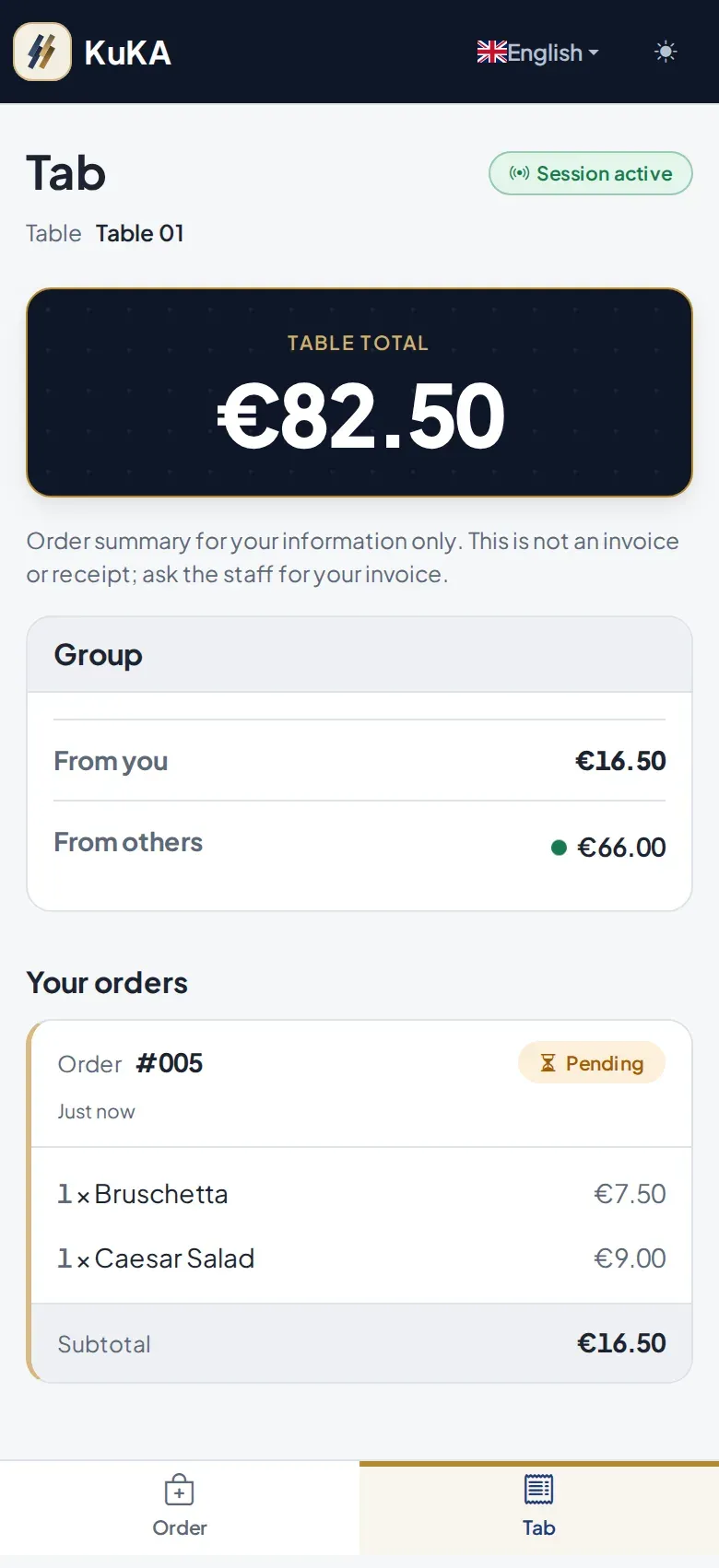
- Your orders, with each order’s number, time and current status.
- Subtotal, the sum of the guest’s own lines.
- From you, the part of the table total that belongs to this guest.
- From others, the part that belongs to the other guests at the table.
- Table Total, the sum of every guest tab at the table.
If the table has an all-you-can-eat plan, the tab also shows the plan, whether drinks are included and the fixed price that applies.
Why the totals are split
Section titled “Why the totals are split”The table total is shared between guest tabs. A guest sees their own amount and the others’ amount, but not the details of what other people ordered. That keeps the tab useful for splitting the payment without exposing everyone’s choices.
It is not an invoice
Section titled “It is not an invoice”The tab is an order summary for the guest’s information. It is not an invoice or a receipt. Payment happens outside KuKA: at the till, at a card machine, or in whatever way your restaurant takes payment. Staff mark the lines paid in Room when the money has been settled.
Live totals and refresh
Section titled “Live totals and refresh”Totals update live while the guest keeps the tab open. If the connection drops, the guest sees a message and a Refresh Tab button. A refresh shows the latest total. Actions such as calling staff also need a connection.
The tab also offers Call Staff and Add More Items, so a guest can ask for help or order another round without scanning the code again.